
The High-Converting Landscaping Website Guide
Build a website that explains fit, proves the work and moves the right visitor to a qualified estimate request.
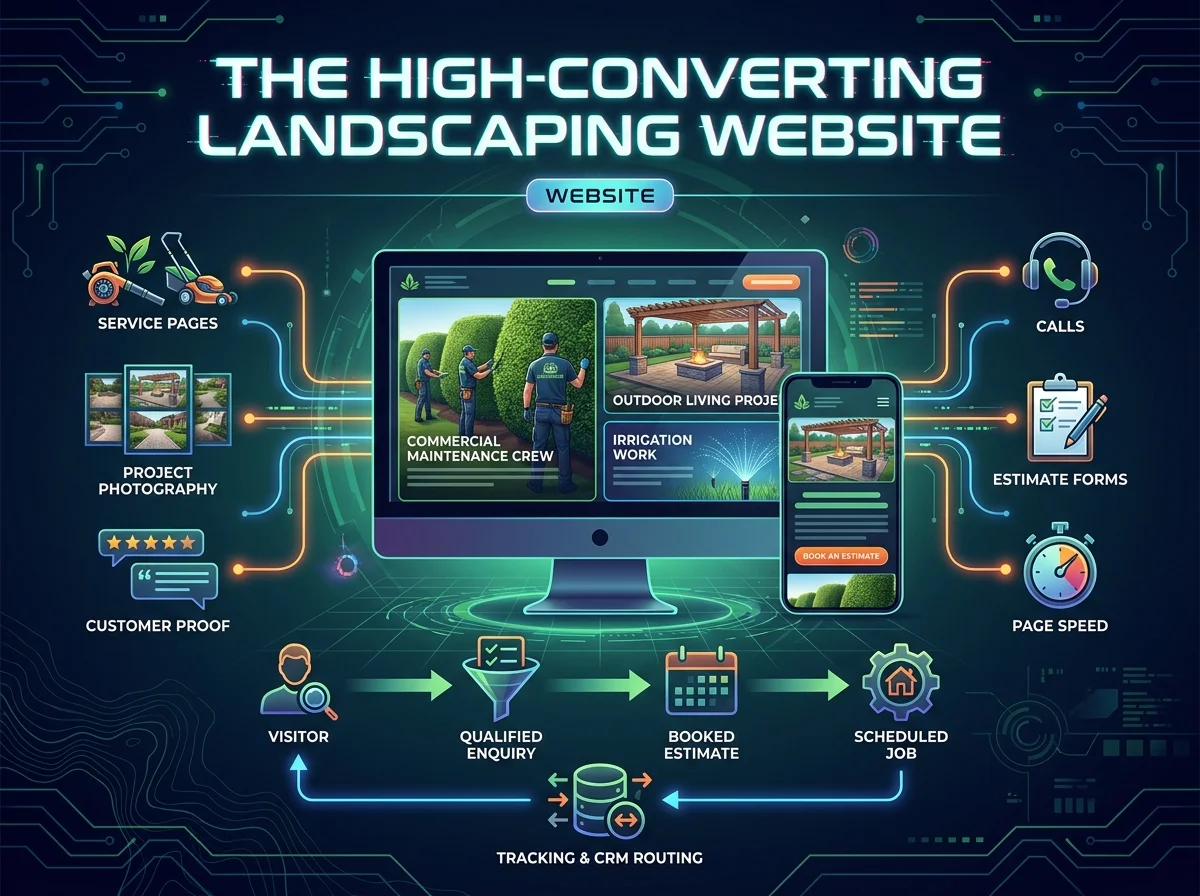
A landscaping website converts when it helps the buyer decide
A high-converting landscaping website makes the service, buyer, proof, process and next step clear within seconds, especially on a phone. It separates service lines, answers decision-stage questions, shows approved project evidence and routes every call or form to a named owner. The website does not finish at submission. It connects the buyer to the sales and operating system behind the work.
The costly problem
Many landscaping websites look polished but do not help a buyer decide. Services blur together, proof lacks context, mobile calls to action disappear and form submissions never reach a named owner.
What this guide delivers
This guide covers information architecture, service pages, mobile conversion, project proof, forms, call tracking, page speed and the handoff from website enquiry to sales follow-up.
The website-to-sales handoff
The conversion path continues after the form. The website, routing and human response need one shared standard.
What this guide covers
- Map buyers, services and conversion paths
- Write a first screen that answers fit
- Build service pages around buyer questions
- Use project photography as evidence
- Design forms that qualify without creating friction
- Fix mobile calls, speed and navigation
- Connect tracking, CRM and field software
- Review conversion quality every month
Map buyers, services and conversion paths
Begin with the company's buyers and decisions, not the navigation menu. A homeowner planning a patio, a property manager comparing maintenance bids and an existing customer reporting an irrigation issue need different pages and actions.
Build the hierarchy around service hubs, individual services, industries, branches, proof, packages and the growth audit. Every priority page should be reachable from a relevant hub in two clicks. Avoid building dozens of pages that do not connect to the buyer journey.
Define the primary action by page type. A design-build page may book a project-fit consultation. A commercial page may request a walk-through. A learn guide may move the reader to a service or audit. One page should not ask for three different commitments.
Website page hierarchy
| Page type | Primary job | Proof needed | Next action |
|---|---|---|---|
| Service page | Explain fit and method | Project, process or approved case study | Book estimate or consultation |
| Branch page | Prove operating presence | Team, territory, services and local work | Call or request service |
| Industry page | Show buyer understanding | Property type, contract process, reporting | Request walk-through |
| Guide | Help solve a decision | Method, table, figure and examples | Move to service or audit |
Every page needs a clear job inside the site architecture.
Write a first screen that answers fit
The first screen should name the service or category, the buyer, the commercial outcome and the reason this company is different. Keep the headline clear enough to survive on a 390-pixel mobile screen.
Use one primary action and one price-qualified secondary path where relevant. Vortox Lab uses Book a growth audit as the primary action and growth packages from $2,000 per month as the persistent secondary route. Ad spend is excluded and should be stated wherever package pricing appears.
Place approved proof near the action, but do not invent reviews, ratings or client counts. If no public case study exists, show the process and what the company measures.
Build service pages around buyer questions
Every service page should answer what the service is, who buys it, what problem it solves, what the work includes, how delivery happens, what season or licensing issue shapes it, where it sits in pricing and what questions a buyer asks before acting.
Headings should carry the argument. Replace Our Process with a specific statement about how the company solves the problem. A reader scanning only headings should understand the service, limitation, process and next step.
Keep one green-industry context paragraph on every page. Name spring rush, fall cleanup, winter slowdown, crew capacity, route density, licensing or the field software the company already uses. This is where domain knowledge becomes visible.
Use project photography as evidence
Project images should prove scope, process and craftsmanship. A finished wide shot shows the outcome. Detail images show materials and installation quality. Progress images explain access, drainage, staging or crew coordination. Captions can tell the part the image cannot.
Use real project photography with client approval. Do not present illustrative composites as named proof. Where a page uses an abstract or generated image, label it as illustration and keep it separate from case studies and testimonials.
Give every image a descriptive file name and alt text that explains its purpose. Avoid stuffing keywords into alt text. The goal is accessibility and useful context.
Design forms that qualify without creating friction
Ask only for information that changes the next action. Name, company, website, phone, service line and biggest problem are enough for a growth audit. A service estimate may need property type, territory, timing or project category.
Tell the visitor why the information is needed, what happens next and how the data will be used. Confirmation copy should state the response window and whether a written review, call or site visit follows.
Error messages should tell the user what to do. Replace invalid input with a direct instruction. Test keyboard use, tap targets, required fields and form completion on a phone.
Form field decision table
| Field | Why ask | When required | Routing use |
|---|---|---|---|
| Name and contact | Respond to the person | Always | Create lead owner |
| Service line | Match the request | Most commercial forms | Send to correct team |
| Property type | Clarify fit | When scope changes by property | Residential or commercial path |
| Timing | Set urgency | Seasonal or project services | Prioritise or nurture |
| Biggest problem | Prepare the response | Consulting or audit | Review before the call |
Remove fields that do not change the response or preparation.
Fix mobile calls, speed and navigation
Most landscaping owners and many buyers review the website from a phone between jobs or after hours. Keep the service, proof and call to action visible without long menus, tiny text or decorative animation that delays the page.
Compress images, remove unused scripts, reserve image dimensions and test real mobile connections. Page speed matters because the visitor may be in a truck, at a property or on a weak connection. It also affects paid landing-page performance and search visibility.
Keep tap targets practical and the phone number accurate. A sticky mobile action can help, but it should not cover content or compete with the page's primary conversion.
Connect tracking, CRM and field software
Every call and form should preserve source, page, service and branch context. Route new leads separately from existing customer service, vendor, employment and billing requests. The website should not create one inbox nobody owns.
Use GA4, Google Tag Manager, call tracking and CRM or field-software stages only where they support a decision. The company should own the accounts. Document access, naming, consent and offboarding before launch.
Test the complete path from website action to human response. Record what happens when the primary owner is absent, the branch is full or the service does not fit.
Review conversion quality every month
Report qualified calls, form completion, booked estimates, page-assisted revenue and the reasons enquiries fail. A higher conversion rate can be worse if the form is attracting smaller or outside-territory work.
Review service pages with the office, estimator and operations team. Marketing sees traffic and page behaviour. Sales sees questions and objections. Operations sees capacity and delivery. The website improves when all three views reach the same backlog and service priorities.
Update the site before each major seasonal shift. Build spring pages and tracking before demand peaks. Use fall to support renewals and snow. Use winter to rebuild the system while the owner has time to make decisions.
What we recommend
Start the redesign with buyer decisions and page hierarchy, not visual style.
Keep one primary action on each screen and state price exclusions clearly.
Use real project proof and label illustrations honestly.
Test the complete mobile call and form path before launch.
Review conversion quality with marketing, sales and operations together.
Put the guide into operation
Map buyers, services, pages and primary actions.
Write the first screens and service-page arguments.
Build mobile pages, proof, forms and tracking.
Launch with routing, response ownership and monthly review.
The numbers to review
Website conversion scorecard
| Measure | What it shows | Review frequency | Owner |
|---|---|---|---|
| Qualified conversion rate | Whether the site attracts the right work | Monthly | Marketing and sales |
| Mobile call completion | Whether phone users can act | Monthly | Web owner |
| Booked estimate rate | Whether routing and follow-up work | Weekly or monthly | Sales owner |
| Page-assisted revenue | Which pages support won work | Monthly | Analytics owner |
| Form failure and abandonment | Where friction stops action | Monthly | Web owner |
Measure the sales result, not only the form submission.
Questions owners ask before acting
How many pages does a landscaping website need?
The site needs enough pages to explain priority services, buyers, branches, proof, pricing and the next step without forcing unrelated intent onto one page. A smaller company may need a focused structure. A multi-branch operator may need many more pages. Quality, ownership and internal linking matter more than a target page count.
What makes a landscaping website convert?
Clear service fit, approved proof, a visible process, mobile usability, a simple action and accountable follow-up produce conversion. Design supports those decisions, but a polished layout cannot replace service clarity, call handling or a named sales owner.
Should a website show pricing?
Show a useful price signal when it helps the buyer qualify. Vortox Lab publishes growth packages from $2,000 per month and states that ad spend is excluded. Project services may use minimum project ranges, consultation fees or contract scope rather than a fixed price.
How often should the website be updated?
Review priority pages monthly for conversion and before major seasonal shifts for service availability, calls to action, hours, proof and capacity. Larger structural updates can happen quarterly. A website that mirrors last year's operation will eventually route the wrong demand.
A website is one part of it. We run the whole growth system.
We connect the build to search, paid media, AI call handling, automation and reporting under one accountable team. Growth packages start at $2,000/mo; ad spend is excluded.
Want to get informed and stay ahead of the curve?
The newsletter carries new chapters, seasonal updates and the working files that go with each guide.