
Landscaping Sales Automation Without Losing the Human Handoff
Recover missed calls, follow up estimates and request reviews through controlled workflows with a named owner.
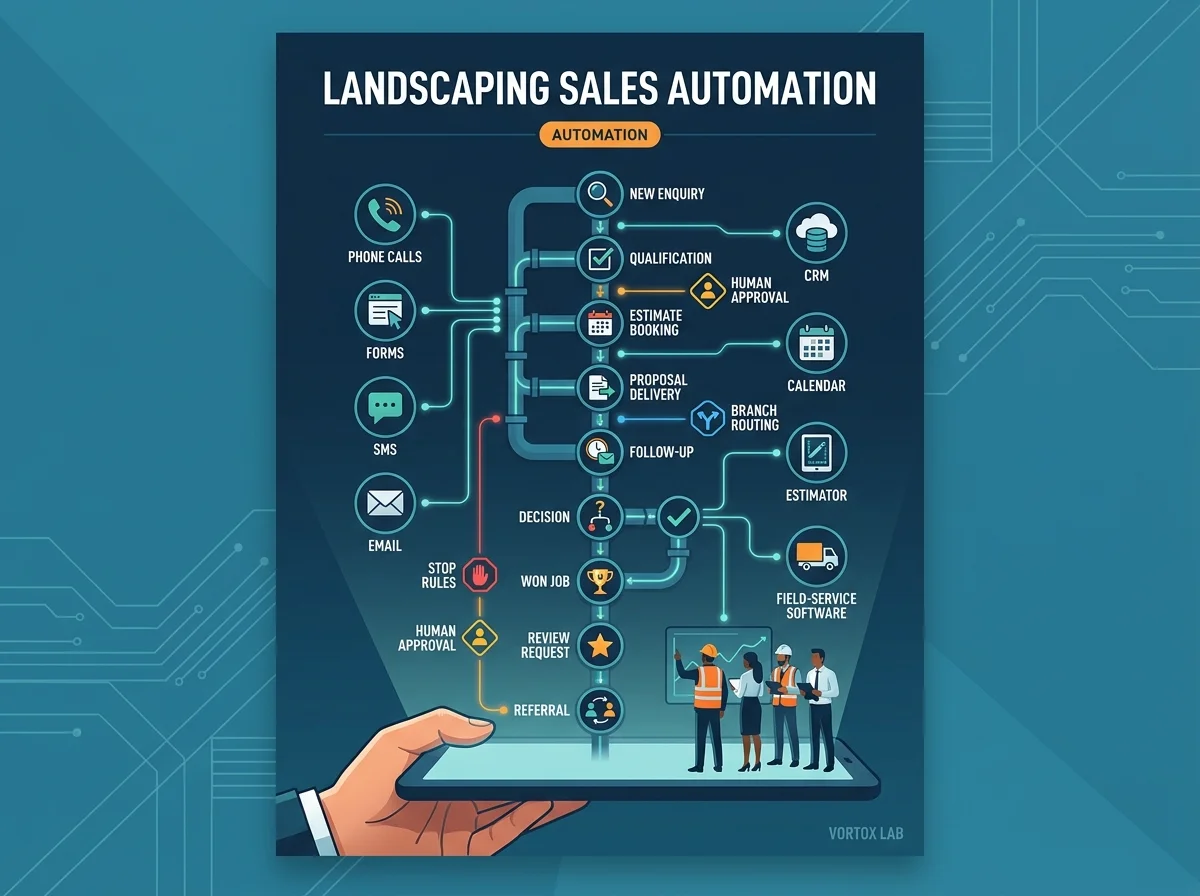
Automation should move one decision and keep one owner
Landscaping sales automation works when a reliable trigger starts a short workflow, the message has enough service and customer context, a named person owns the outcome and the sequence stops when the customer acts, declines or needs service recovery. The objective is not to send more messages. It is to prevent useful work from being lost between the phone, estimate, CRM and field operation.
The costly problem
Automation fails when it sends more messages but leaves ownership unclear. Missed-call texts, estimate reminders and review requests can damage trust when they ignore service issues, sales stages or customer decisions.
What this guide delivers
This guide shows how to map triggers, assign human owners, set stop rules, connect workflows to the CRM and measure bookings, decisions, reviews and referrals.
The controlled automation model
Automation moves the record. A person remains accountable for the commercial or service outcome.
What this guide covers
Choose the workflow worth automating
List repetitive gaps that cost time or work: missed calls, slow web-form response, estimate follow-up, appointment reminders, dormant leads, review requests, referral requests and renewal tasks. Record volume, failure rate, value and the current human process.
Start with a workflow that has a reliable trigger and clear next decision. Missed-call recovery often works because the phone event is definite. Estimate follow-up works only when stages and ownership are accurate. Review automation works only when completion and open issues are recorded.
Avoid automating rare, high-risk or unresolved processes. Service complaints, pricing disputes and complex technical questions need human judgment before they need speed.
Automation candidate score
| Workflow | Trigger reliability | Risk if wrong | Volume | Start now? |
|---|---|---|---|---|
| Missed-call recovery | High | Medium | High in peak season | Yes, with consent and owner |
| Estimate follow-up | Medium | Medium | Steady | After stages are clean |
| Review request | High if completion is reliable | High when issues are open | Steady | Yes, with service gate |
| Complaint handling | Low | High | Low | No, human-led |
Choose the workflow from trigger quality and risk, not novelty.
Define the trigger and required context
A trigger is the event that starts the workflow. It may be a missed call, submitted form, estimate sent, appointment booked, job completed or contract approaching renewal. Write exactly which system creates the event and what data must exist before anything sends.
Context determines whether the message is useful. Include service, customer status, branch, owner, timing, stage and any open issue that changes the path. A generic reminder without context can reach the wrong person or ask for a review while the crew is returning for a callback.
- Create a fallback when the trigger is missing data. The workflow should pause and create a human task rather than guess.
Assign a human owner and response deadline
Every automation needs one current owner. A confirmation can send immediately, but a qualified enquiry still belongs to the office, estimator or branch. The task should carry the customer context and a deadline the team can meet.
Define absence and overflow. If the estimator is off, who receives the task? If the branch is full, does the lead move to another location, a future-date nurture or a polite decline? Automation exposes ownership gaps that were previously hidden in inboxes.
- Report unowned and overdue records. A workflow that sends messages while tasks sit untouched creates activity without service.
Write messages that move one decision
Each message should have one job: confirm, ask a qualification question, book, review an estimate, reschedule, request feedback or refer a problem to a person. Keep the language direct and state what happens next.
Use the customer's service and stage when appropriate. A design-build estimate follow-up should not sound like a lawn-care reminder. An existing customer with an open issue should not receive new-lead language.
Limit the sequence. One useful message and one human call may outperform five automatic reminders. The sales owner should decide when a high-value opportunity needs direct contact.
Build stop, exception and escalation rules
Stop when the customer books, wins, loses, opts out, asks for a person, reports a service issue or reaches the end of the approved sequence. Do not continue simply because the automation platform can.
Exceptions protect trust. Pause review requests for callbacks and disputes. Escalate high-value projects, safety issues, complaints and unclear answers. Route existing customers away from new-lead qualification.
- Test the exceptions with real records before launch. The normal path is easy. The wrong-stage customer is where damage happens.
Stop and exception matrix
| Condition | Automation action | Human action | Final state |
|---|---|---|---|
| Customer books | Stop sequence | Confirm appointment | Booked |
| Customer opts out | Stop immediately | Record preference | Closed |
| Open service issue | Pause sales or review workflow | Operations resolves | Resume only if appropriate |
| No response after limit | Stop automatic messages | Owner chooses nurture or close | Dormant |
| High-value or complex request | Pause standard path | Estimator contacts | Active human follow-up |
Stop rules should be visible to the team, not hidden inside the platform.
Connect CRM and field-service stages
Use one stage model from new enquiry through qualification, estimate, decision, won, lost and nurture. Keep service cases separate from sales. Automation should read and update the same stages the team uses, not create a second hidden pipeline.
Move source, service, branch, notes, messages and tasks with the record. Document which system is the source of truth and what happens if an integration fails. The company should own the accounts and data.
Field software can provide completion, appointment and customer context. CRM can manage sales ownership and follow-up. The best architecture depends on the tools already in use, but the rules should remain visible outside the automation builder.
Measure recovered work and customer response
Measure the operating result for each workflow. Missed-call recovery needs response, qualification, human follow-up and bookings. Estimate automation needs replies, decisions and won work. Review automation needs eligible jobs, requests, reviews and service issues intercepted.
Report exceptions and failures. A high send rate means little if messages reach closed jobs, duplicate records or opted-out contacts. Quality and stop-rule compliance matter alongside revenue.
Review the workflow by season. Spring may need response and booking support. Fall may prioritise renewals. Winter may focus on dormant estimates, reviews, website projects and next-season preparation.
What we recommend
Automate one reliable, high-volume workflow before building a network of sequences.
Give every record a named human owner and visible response deadline.
Use service, stage, branch and issue context before sending.
Write stop and exception rules before the first live record.
Measure bookings, decisions, reviews and recovered work rather than send volume.
Put the guide into operation
Select one workflow and document the current failure.
Write trigger, context, owner, messages and stop rules.
Connect stages and test normal and exception paths.
Launch controlled volume and review outcomes weekly.
The numbers to review
Automation operating scorecard
| Workflow | Primary result | Quality check | Failure signal |
|---|---|---|---|
| Missed-call recovery | Bookings recovered | Human follow-up time | Messages without owner |
| Estimate follow-up | Decisions and won work | Correct stage and service | Messages after decision |
| Review requests | Reviews from eligible jobs | Open issues excluded | Requests during service recovery |
| Renewal tasks | Renewals started on time | Account health reviewed | Last-minute outreach |
Each workflow needs its own result and failure definition.
Questions owners ask before acting
What should a landscaping company automate first?
Start with a high-volume process that has a reliable trigger and clear next decision. Missed-call recovery, form confirmation or appointment reminders often fit. Estimate follow-up and review requests should wait until sales stages, completion and open issues are recorded accurately.
How many messages should an automated sequence send?
Use the fewest messages needed to move the decision and create human accountability. The right number depends on service, stage and value. A short confirmation plus a human call may be better than a long sequence. Set a clear endpoint and respect opt-outs.
Can automation replace sales follow-up?
No. It can confirm, remind, collect context and create tasks, but a person still owns qualification, objections, scope, pricing, service recovery and the final decision. Good automation makes that ownership harder to miss.
Which tools should we use for landscaping automation?
Choose tools that connect reliably to the phone, website, CRM and field software already in use. The decision should consider volume, ownership, data access, hosting, failure handling and staff support. The workflow rules matter more than the brand of automation platform.
Automation is one part of it. We run the whole handoff.
We connect missed calls, estimates, reviews and referrals to websites, AI, CRM stages, reporting and accountable people. Growth packages start at $2,000/mo; ad spend is excluded.
Want to get informed and stay ahead of the curve?
The newsletter carries new chapters, seasonal updates and the working files that go with each guide.